
Passive vs Active Screen Time for Kids Guide
Learn the difference between passive video consumption and active brain play with research backed screen time guidelines for kids.
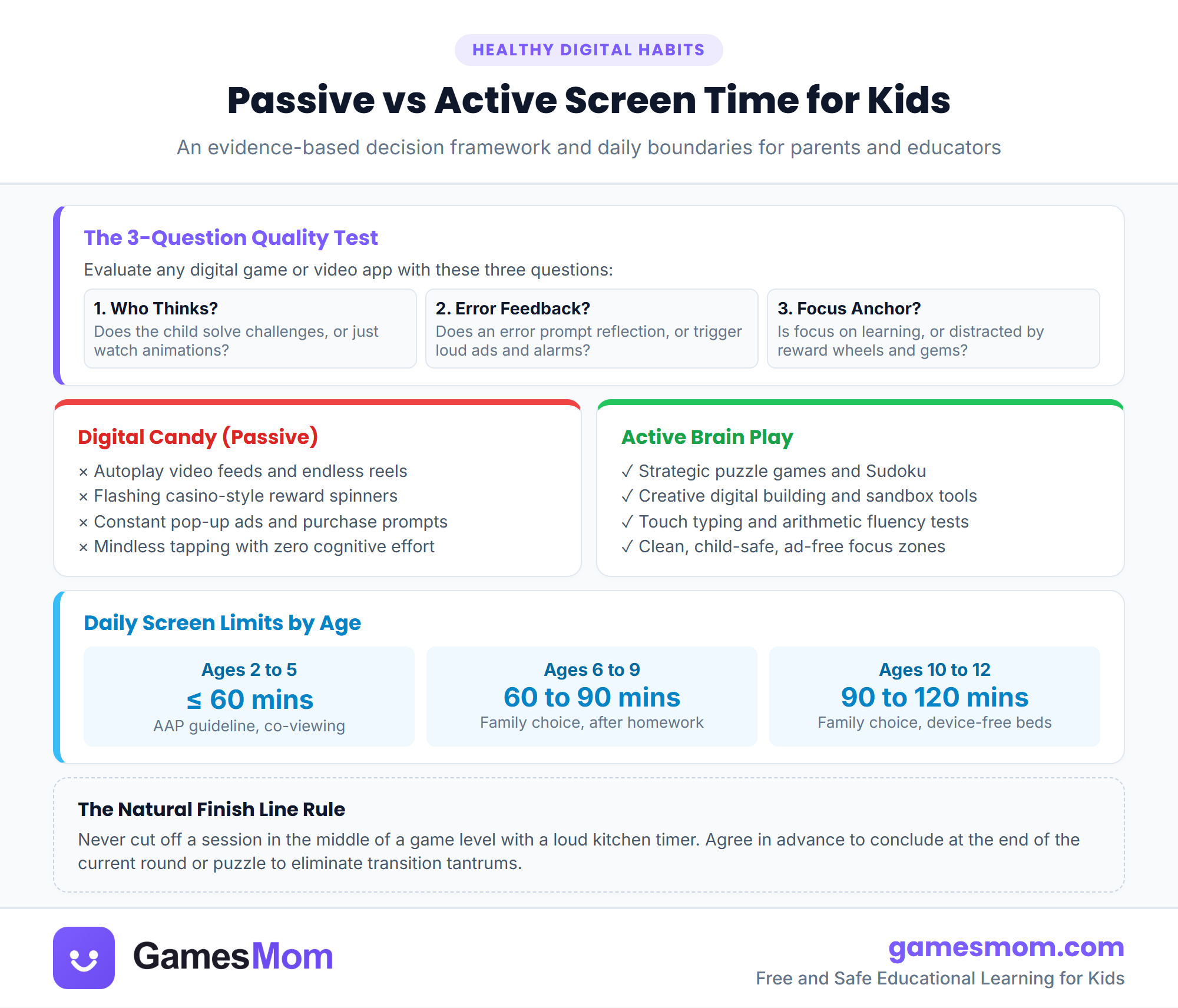
- Quality of screen content matters far more than total minutes alone.
- Active games require children to make decisions, solve problems, and reflect on mistakes.
- Digital candy relies on variable reward wheels and autoplay loops that fracture attention.
- Ending sessions at the natural conclusion of a puzzle round prevents transition meltdowns.
- American Academy of Pediatrics (AAP) Media Guidelines
- National Association for the Education of Young Children (NAEYC) Digital Media Position Statement
Why screen quality matters more than a single timer
Most parent advice centers on a single number of minutes per day. While time limits are helpful, treating all digital media as identical creates unnecessary anxiety. An hour spent building spatial models in a puzzle game exercises working memory, whereas an hour watching algorithmic autoplay videos offers passive entertainment. The American Academy of Pediatrics highlights that content context, design ethics, and joint caregiver engagement matter far more than clock watching.
When evaluating whether an activity is beneficial, consider who is directing the action. In high quality educational tools, the child actively plans moves, predicts outcomes, and tests solutions. In predatory free apps, automated flashy graphics lead the child to tap mindlessly. Explore our collection of educational games for kids to see how thoughtful design supports developing minds.
Another critical distinction lies in error feedback. Thoughtful learning games treat errors as neutral information. If a block falls or a math calculation misses, the child adjusts their strategy without penalty. Manipulative games punish errors by locking the screen behind timers or offering paid shortcuts, which fosters impatience rather than resilience.
The three question test for parents
You can evaluate any children app in under thirty seconds using three straightforward questions. First, who is doing the thinking? If you cannot identify what decision your child made in the last half minute, the software is likely doing all the heavy lifting for them.
Second, how does the application handle mistakes? Look for games where getting an answer wrong encourages immediate exploration. On GamesMom, our free interactive quizzes for kids offer full sentence explanations after each question, helping children understand the underlying concepts right away.
Third, where does the software direct attention next? Digital candy surrounds children with flashing banners, spinning prize wheels, and notifications designed to trigger compulsive taps. Clean learning environments keep the child focused purely on the educational challenge.
Age appropriate daily rhythms and routines
For preschoolers aged three and four, digital media works best as a shared activity. Limit sessions to twenty or thirty minutes of co-play, focusing on chunky shape matching, nursery rhyme lyrics, and simple animal sorting games. Sit beside your child, talk about the characters, and celebrate small wins together.
Early elementary children aged five to seven benefit from targeted skill builders. Sessions between thirty and forty five minutes work well for letter tracing and foundational math games for kids that build number sense. Keep digital play scheduled after outdoor movement and homework are complete.
For upper elementary children aged eight to twelve, prioritize strategic logic challenges. Puzzles like Sudoku, spatial sorting, and touch typing practice channel screen time into valuable cognitive habits. Always agree on a finish line, such as completing the current board, to ensure a calm transition away from the device.
Frequently asked questions
How much screen time does the AAP recommend for young children?
The American Academy of Pediatrics recommends avoiding non-video-chat digital media for children under eighteen months. For ages two to five, the AAP recommends no more than one hour per day of high quality, co-viewed or co-played educational content.
What makes a game educational rather than digital candy?
An educational game requires the child to make deliberate decisions, solve puzzles, and learn from mistakes. Digital candy relies on automated play, flashing lights, spinning prize wheels, and ads that push endless engagement without cognitive effort.
How can I print or save this screen time infographic?
Click the Print / Save PDF button on this page to print a clean, high-resolution copy on US Letter or A4 paper, or click Download High-Res Image to save the graphic to your device.